
About half of professionals in legal, accounting, tax, and consulting are already using AI every week. Most of their firms have no idea whether it’s making any difference.
Research from early 2026 found that only around one in five firms is measuring any return from their AI investment. That gap, between widespread use and measurable impact, is the most important problem in professional services right now.
The reason for the gap isn’t that AI doesn’t work. It’s that most firms started in the wrong place.
Why Starting With AI Drafting Tools Is a Low-Return Move
When most professional services businesses start with AI, they start with the same things: drafting emails faster, summarizing meeting notes, and generating first drafts of proposals or reports.
These tools work. They save time. They’re easy to adopt because there’s no integration required. You open a tool, type a prompt, and get something useful.
They are a great starting point, but the problem is that they’re the lowest-leverage place to deploy AI in your business.
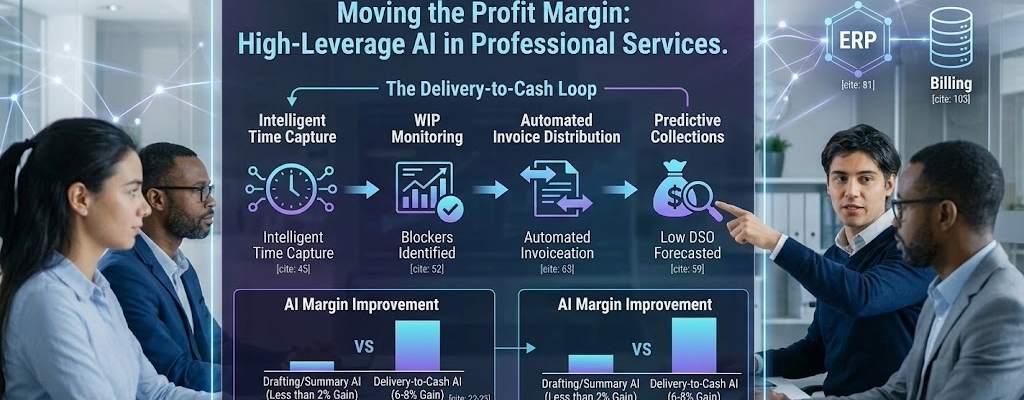
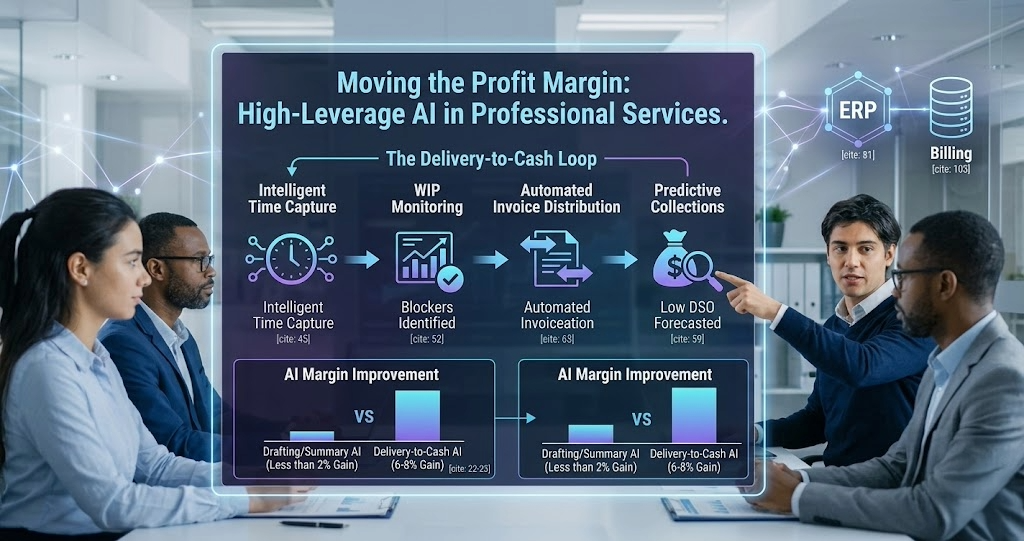
Research from early 2026 puts a number on this. Firms focused primarily on drafting, summarizing, and formatting were seeing margin improvements of less than 2%.
On the other hand, firms that had extended AI into predictive planning and delivery-side workflows were achieving gains of 6 to 8%.
That’s a three-to-four-fold difference in margin outcome, from the same technology, depending entirely on where they aimed it.
So the question isn’t whether to use AI. It’s where to point it.
The Delivery-to-Cash Loop: Where the Leverage Actually Is
The highest-leverage area in a professional services business is the delivery-to-cash loop. It’s the sequence of steps that starts when your team does billable work and ends when the money from that work arrives in your bank account.
In between those two points, value leaks out in predictable places:
- Time that gets done but doesn’t get captured
- Work that gets captured but doesn’t get billed
- Invoices that go out late, to the wrong contact, or without the right documentation
- Clients who pay at ninety days when your terms say thirty
- WIP that sits on the books for weeks because nobody’s confirmed it’s ready to invoice
Each of those is a friction point with a real cost. And in most professional services firms, most of them are still managed manually.
That’s where the leverage is. In compressing the time between doing the work and getting paid for it, and eliminating the leakage in between.
The Six AI Use Cases Worth Your Attention
Here are the six use cases I see with the most genuine traction in this area. A few of them are covered in detail in the related posts below. I’ll focus here on the ones that get less attention.
1. Intelligent Time Capture
Manual time entry is one of the most expensive habits in professional services. It’s delayed, it’s inaccurate, and it systematically under-captures billable activity. It is also the most unpopular task for employees.
AI time capture monitors calendar entries, emails, documents, and activity patterns, then suggests time entries for the employeel to review and confirm. Firms using AI-suggested entry instead of manual entry report capturing 5% to 10% more billable hours from activities that were previously forgotten or written off. That’s not a process improvement. That’s revenue recovery.
Not to mention the hours of timesheet completion saved per week!
2. WIP Management and Billing Readiness
Most firms have work in progress that should have been invoiced weeks, if not months, ago. It’s sitting in the system unbilled because of a missing approval, an unresolved query, or simply because it is not being monitored.
AI-driven WIP monitoring automatically identifies those blockers. It surfaces what’s ready to bill, what’s held up and why, and what’s at risk of becoming a write-off.
It turns a passive ledger entry into an active prompt for action.
For most firms, this is the fastest path to improving cash flow without changing how work gets delivered.
3. Predictive Collections
This one is underused and underappreciated.
AI can analyze payment history across your client base and predict which outstanding invoices are likely to be paid late, before they become overdue.
Your team can make proactive contact at the right moment rather than chasing reactively after a payment has already slipped. Firms using this approach have reported reductions in days sales outstanding (DSO) of thirty days or more, which is a significant improvement in cash position for any firm carrying meaningful receivables.
4. Automated Invoice Distribution
Once an invoice is ready, someone still has to send it. In most firms, that means checking contact details, confirming whether attachments are required, and assembling the email by hand, for every invoice, every month.
Automated invoice distribution handles all of that from information already in the system. We recently built this workflow for a client.
It’s covered in more detail in the related reading below.
5. AP Intake Automation
On the payables side, most firms are still manually reviewing the AP inbox and keying vendor invoice data into the accounting system.
Automated AP intake reads incoming invoices, extracts the data, and posts it to the system. The human role shifts from data entry to exception review.
This is also covered in depth in the related reading.
6. Resource and Capacity Planning
If you can’t see accurately who’s available, at what skill level, and when, you end up with:
- Senior people on work that should go to juniors
- Bench time you didn’t anticipate
- Projects that run over because the staffing wasn’t right from the start.
AI-driven resource planning uses pipeline data, project history, and skills information to recommend staffing decisions before the problem becomes visible. One study found a 12% reduction in bench time and a 7% increase in billable utilization in a firm that made this shift. (Source: Unit4, AI in Professional Services: From Efficiency to Advantage, 2026.)
Why Most Firms Aren’t There Yet
The use cases above, particularly predictive planning, WIP intelligence, and collections forecasting, don’t just need a workflow. They need your ERP, your project system, and your billing data to be clean, connected, and consistent with each other.
In most professional services firms, they’re not.
Gartner reported that at least half of all generative AI projects were abandoned after the proof-of-concept stage. The leading causes weren’t the technology. They were:
- Poor data quality
- Unclear business value, and
- Unadequate controls.
The more structured the workflow (and the easier the outputs are to audit), the faster AI ships. The more predictive the use case, the more it relies on data that most firms haven’t cleaned up yet.
That’s not a reason to avoid these use cases. It’s a reason to understand what the actual prerequisite is before you start.
Where to Start
You don’t have to tackle all six at once. The firms that make the most progress start with one workflow, prove value, and build from there.
The best starting point is usually the use case where the manual cost is most visible, and the process is most consistent.
Once one workflow is running, the infrastructure you’ve built, the integrations, the exception handling, and the monitoring make every subsequent workflow faster and cheaper to implement.
The goal isn’t automation for its own sake. It’s closing the gap between doing the work and getting paid for it, with as little friction as possible.
See What This Looks Like in Practice
Frequently Asked Questions
AI drafting tools, like writing assistants or meeting summarizers, work on individual tasks and don’t connect to your business systems. AI workflow automation connects to your ERP, billing system, and other tools to handle repeatable operational processes automatically. The productivity gains from drafting tools are real but limited. Workflow automation compounds across every transaction in your business.
Some workflows, like timesheet reminders, can run on top of your existing systems even without a full ERP. But the highest-leverage use cases, AP intake, invoice distribution, WIP management, and collections, deliver significantly more value when connected to a central system of record. If you’re running on spreadsheets and disconnected tools, addressing that foundation first will materially improve what automation can do for you.
The automation monitors your project billing data on a set schedule and flags any work in progress that has passed its expected billing date, is missing an approval, or shows signs of becoming a write-off. It delivers a daily or weekly summary to whoever owns billing, including the specific blockers. The goal is to turn an invisible backlog problem into an active, manageable list.
Predictive collections needs a history of payment behavior by client, which most firms have in their accounting system but rarely analyze. The AI model looks at patterns, how quickly a client typically pays, whether they pay late on certain invoice types, and whether recent behavior has changed, and surfaces the invoices most likely to slip before they become overdue. It works best when you have at least twelve months of payment history in a single system.
Poor data quality is the most common cause. The AI is being asked to work with incomplete, inconsistent, or system-agnostic information. The second most common cause is that nobody measured what success looked like before the project started. Both are solvable, but they need to be addressed before implementation, not after.
ERP vendors are increasingly building AI capabilities into their platforms, particularly around time suggestions, billing alerts, and reporting. Where those features exist and work for your use case, they’re worth using first. Workflow automation becomes most valuable for cross-system processes, such as connecting your ERP to your email system for invoice delivery, or linking your billing data to your collections outreach, that the ERP itself can’t handle natively.