


Modern ERP systems have become essential tools for running efficient, data-driven professional services businesses. Yet many firms still hesitate, thinking ERP is only for manufacturing or Fortune 500 giants. That couldn’t be further from the truth.
In project-based businesses such as advertising agencies, consultancies, or engineering firms, ERP platforms bring together financials, delivery, people, and clients into one unified environment. But to realize this value, you need to understand one key thing:
ERP success is about people, not just software.
That means identifying who will use the system, how they will use it, and what they need to get from it.
Understanding ERP Users in a Professional Services Context
ERP users in a professional services business can be grouped not only by department or seniority, but by how deeply they interact with the system. This helps shape both the implementation approach and user training strategy.
At a high level, ERP users fall into three functional tiers:
Basic Users
Basic Users
These users touch the ERP system only for essential functions, often as a compliance requirement.
- Examples: Consultants, designers, analysts, or creatives entering time and expenses
- Typical ERP Actions: Submit timesheets, log PTO, view assignments
- Needs: Simplicity, clarity, reminders (e.g., for missing time)
- Risks if ignored: Delayed billing, inaccurate reporting, poor data quality
Advanced Users
These users operate across multiple modules and use ERP data to manage teams, budgets, or client deliverables.
- Examples: Project Managers, Resource Managers, Finance Analysts
- Typical ERP Actions: Track budget vs actuals, plan resources, approve time/expenses, run departmental reports
- Needs: Dashboards, exception alerts, cross-module views
- Risks if unsupported: Budget overruns, poor utilization, delivery delays
Super Users
Often internal champions or power users with deep knowledge of both ERP functionality and business processes.
- Examples: Finance Directors, PMO Leads, ERP Admins
- Typical ERP Actions: Configure workflows, build reports, coach other users, troubleshoot issues
- Needs: Early involvement, access to configuration tools, training investment
- Implementation Focus: Early involvement in design and UAT, ongoing feedback loop with the vendor or internal support team.
- Risks if misused: Low adoption, over-reliance on vendor, resistance to change
Pro Tip
Your ERP rollout should not treat all users the same. Plan communication, training, and testing by user type, not just job title.
Key ERP Users by Department
💰 Finance and Accounting
Finance teams are often the biggest drivers of ERP adoption, and the biggest beneficiaries. In services businesses, where margin is won or lost on hours worked and billed, real-time financial visibility is non-negotiable.
Advanced and Super Users in Finance rely on ERP for:
- Automated billing: time & materials, retainers, fixed fee, milestone
- Revenue recognition: aligned to delivery milestones and client contracts (ASC 606 / IFRS 15)
- Multi-currency, multi-entity management
- Cash flow forecasting tied to WIP and AR
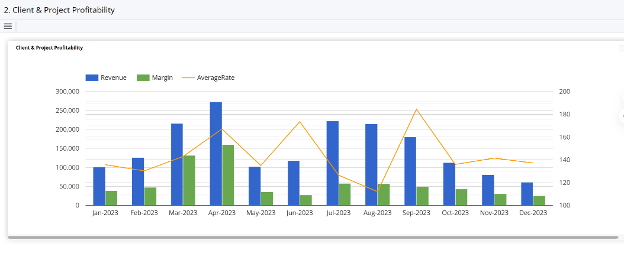
- Client and project profitability by team, service line, or region
Super User Insight
Finance leads often configure dashboards to show live gross margin by client, trailing 3-month AR aging, or underutilized teams. This enables strategic decisions and not just reporting.
📅 Project Management and Delivery
Project Managers are power users of ERP in professional services. Their role demands constant awareness of time, budget, scope, and people.
Advanced Users (PMs) use ERP to:
- Create and update project plans (no more disconnected Gantt charts)
- Track budget vs actuals in real-time
- Approve time/expenses
- Forecast resource needs
- Flag scope creep or risk early
ERP systems also support Earned Value Analysis, Estimate at Completion (EAC), and variance reporting, critical tools for advanced project governance.
Deeper Insight
Modern project-based ERPs allow PMs to link schedules to billing milestones, helping them flag risks not just to delivery, but to revenue.
🔁 Resource Management & Operations
In project-based businesses, operations staff are responsible for making sure people are working on the right things at the right time. Without ERP, this usually means juggling spreadsheets and Slack messages.
Advanced Users in Ops benefit from ERP’s:
- Unified resource calendars across teams
- Real-time capacity tracking and forecasting
- Integration with PTO, public holidays, and hiring pipelines
- Skills-based assignment (especially valuable for specialized teams)
Super User Value
Ops leads can configure capacity dashboards and resourcing heatmaps that span departments and time periods, enabling predictive hiring and avoiding burnout.
Stat Highlight
Agencies using integrated resourcing tools report up to a 20% increase in billable utilization within 12 months.
👩💼 Human Resources and Talent Management
In services firms, your people are the product. ERP systems help HR teams go beyond admin to become strategic partners in delivery.
ERP helps HR:
- Maintain centralized employee records
- Track PTO and leave across teams
- Manage onboarding, offboarding, and contract renewals
- Integrate hiring pipelines with resourcing plans
- Track certifications, compliance, and skills for project planning
🧑💼 Executives and Business Leaders
Executives don’t enter time, but they rely heavily on ERP data. For them, ERP is not a tool for data entry, but for visibility and control.
Super Users at the executive level use ERP for:
- Forecasting revenue and profitability by client, service line, or team
- Monitoring utilization and realization
- Modeling hiring needs based on backlog and pipeline
- Reporting KPIs to boards or investors
ERP for Small vs Large Firms: Different Needs, Same Principles
| Attribute | Small & Midsize Firms | Enterprise Firms |
| Modules | Core (Finance, PM, CRM) | Full suite (HR, Legal, Procurement) |
| Customization | Standard workflows with light config | Extensive, role-based, multi-entity setup |
| Team Size | 10–150 | 500+ |
| Implementation Time | 8–16 weeks | 6–18 months plus |
Cloud-based ERP systems have made enterprise-grade functionality accessible to smaller firms without the overhead.
How to Know If Your Business Is Ready
Ask yourself:
- Are you running multiple disconnected systems (e.g., project software + finance + CRM)?
- Are your reports still built manually?
- Do time tracking or invoicing delays impact cash flow?
- Do you lack visibility into client, team, or project profitability?
If the answer is “yes” to two or more of the above, it’s time to evaluate ERP.
Pro Tip:
Map current pain points by department. Then map users by type (basic, advanced, super). This creates a blueprint for both implementation and change management.
📝 Looking for a new ERP:
The Bottom Line: ERP Is About Empowering Your People
The biggest mistake firms make? Thinking ERP is just a system for finance. In reality, it’s a system for everyone, from delivery to leadership.
Understanding your ERP users, their needs, behaviors, and capabilities, is foundational to implementation success. When done right, ERP doesn’t just support the business. It transforms it.
Ready to explore how ERP can support your teams at every level?
📥 Downloadable Resource:
Estimate the time and cost savings of ERP across key departments.
Frequently Asked Questions
In a professional services firm, ERP users typically fall into three categories:
- Basic users, such as consultants or creatives, who enter time, expenses, and check assignments.
- Advanced users, like project or finance managers, who oversee budgets, approvals, and reporting.
- Super users, including finance leads, PMO directors, or ERP admins, who manage configurations, run complex reports, and support adoption.
Understanding these ERP user roles helps businesses design training plans and workflows that fit real needs.
ERP software supports project managers by consolidating planning, execution, and reporting into a single system. It enables:
- Real-time budget vs actual tracking
- Automated time and expense approvals
- Resource allocation based on capacity and skills
- Visibility into milestones, risks, and deliverables
This makes it easier for PMs to deliver profitable projects on time without relying on disconnected spreadsheets.
Finance teams in consulting or agency environments benefit from ERP through:
- Automated billing for complex contracts (T&M, retainer, milestone)
- Accurate revenue recognition aligned with project delivery
- Real-time WIP, AR aging, and profitability dashboards
- Multi-currency, multi-entity financial consolidation
This reduces manual work, speeds up month-end close, and improves financial visibility across the business.
Yes, many cloud-based ERP platforms are now tailored to small and mid-sized professional services businesses. These systems offer:
- Modular setups for core functions like finance, project management, and time tracking
- Role-based access for different user types
- Faster implementations (typically 8–16 weeks)
- Lower total cost of ownership compared to enterprise systems
Smaller firms can now gain enterprise-level visibility and control without the complexity.
Executives use ERP dashboards to access high-level metrics such as:
- Billable utilization and realization rates
- Client and project profitability
- Backlog, WIP, and forecasted revenue
- Departmental performance by cost center or team
These real-time dashboards help COOs and CFOs make informed decisions around staffing, pricing, and strategic growth initiatives.